Blog
Nomad: a work/break timer that stays out of your way
· 4 min read
I built Nomad because every focus timer I tried wanted an account, a subscription, or a whole system to learn. Nomad asks for a work length and a break length, then keeps time from your system tray. Free, open source, and now at v1.0 for Windows, macOS and Linux.
- Nomad
- Productivity
- Tauri
- Rust
- Open source
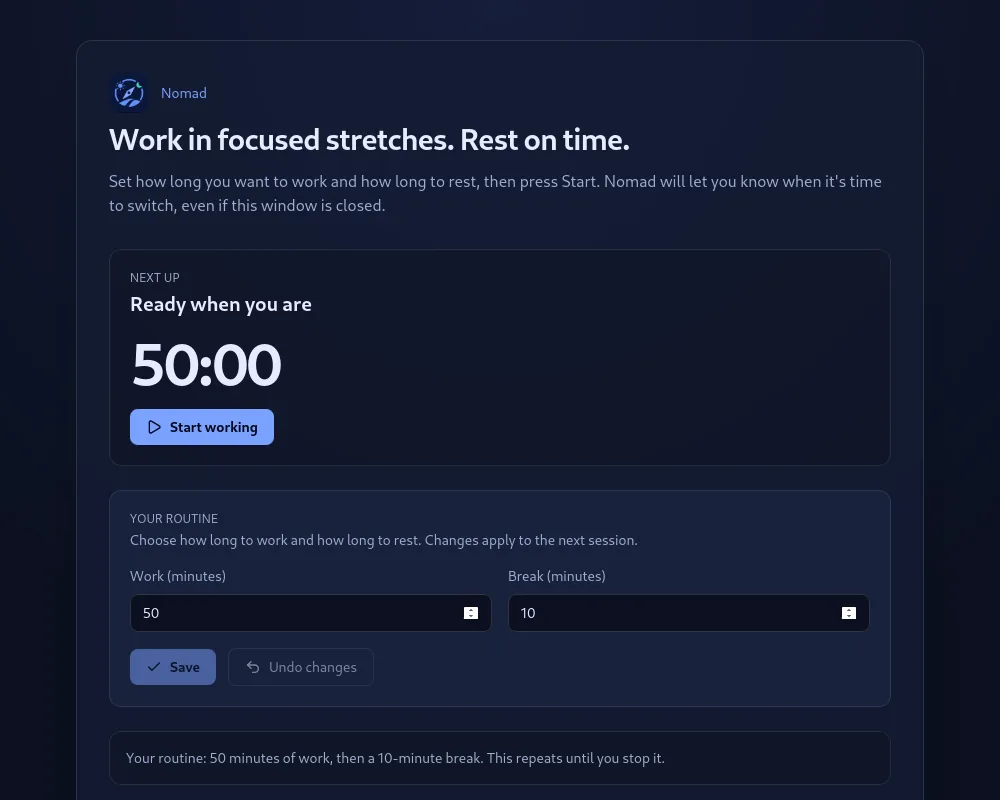
Nomad is a small desktop app that helps you work in focused stretches and rest on time. You tell it how long you want to work and how long you want to break, press Start, and get on with your day. When the work session ends it sends a notification telling you to step away. When the break ends it tells you to come back. That repeats until you stop it.
That is the whole app. This post is about why I made it that way.
Why I built it
I spend most of my day at a screen, and I am bad at taking breaks on my own. So I tried the usual focus timers, and each one lost me for a different reason.
Some wanted an account before I could set a timer. Some put the useful parts behind a subscription. Some were a whole productivity system, with projects and tags and statistics, when all I wanted was a countdown. And the simple ones had a habit I found maddening: I would close the window by accident, and the session would be gone.
So I wrote down what I actually wanted:
- Two numbers, work and break, and a Start button.
- A notification at every switch, so I do not have to watch the clock.
- Something that lives in the system tray and does not need the window open.
- No account, no cloud, no analytics, nothing to pay for.
Nomad is that list, and deliberately nothing more.
What it offers
A routine, not a to-do list. You set a work length and a break length, in minutes or hours. Nomad cycles between them automatically: a finished work session starts a break, a finished break starts the next work session. Pause when life interrupts, resume when it does not, or stop and reset to begin fresh.
Native notifications. Every transition sends a normal system notification with the length of the block that is starting. On Linux it goes through libnotify directly, so it looks like every other notification on your desktop. On macOS and Windows it uses the system notification API.
It lives in the tray. The tray tooltip shows the current phase and the time left, and the tray menu has Open, Start, Pause, Resume, Stop and reset, and Quit. Closing the window does not kill the timer. It just hides the window to the tray, so you cannot lose a session by accident any more. Nomad only exits when you choose Quit from the tray.
Plain language everywhere. The app is written for anyone who works at a computer, not just developers. The home screen says "Ready when you are" rather than "Idle", the buttons say "Start working" and "Undo changes", and the status line reads like a sentence: your routine is 50 minutes of work, then a 10-minute break, repeating until you stop it.
Settings that stay on your machine. Your durations are stored in a single JSON file in your user folder. There is nothing to sync and nothing leaves your computer.
What it does not do, on purpose
No cloud sync or accounts. No team or shared schedules. No statistics dashboard. No mobile app. I am not saying those are bad features. They are just not what Nomad is for, and leaving them out is what keeps it small enough to trust.
How it is built
Nomad is a Tauri v2 app, which means a small Rust core with a React and TypeScript frontend. The Rust side owns the system tray, its menu, and Linux notifications. The frontend owns the timer. The timer logic itself is a pure state machine with no React or Tauri imports in it: it takes the current state and an event and returns the next state, and everything with a side effect (the one-second tick, notifications, tray updates) lives in separate hooks around it. That split is what made the app easy to finish, and it is what I would point a contributor at first.
The installers are built by GitHub Actions for every tagged release, for Linux, Intel Macs, Apple Silicon Macs, and Windows. The code is MIT licensed.
Get it
Version 1.0.0 is out now. Download the installer for your platform from the release page:
| Platform | Package |
|---|---|
| Windows | .exe or .msi installer |
| macOS | .dmg for Apple Silicon and Intel |
| Linux | .deb, .rpm, or .AppImage |
One honest caveat: the macOS and Windows builds are not code-signed yet, so you will see a Gatekeeper or SmartScreen warning the first time you open it. Right-click and choose Open on macOS, or click through "More info" on Windows. Signing is on the list.
If you prefer to build it yourself, the README has the steps. You need Node.js, the Rust toolchain, and on Linux the libnotify development package.
What I would like to hear
Two things, if you try it. Does the tray behaviour feel right, especially closing the window and finding the timer still running? And what is the one feature you would need before using it every day? Bug reports and small improvements are welcome as GitHub issues, and if you want to build something bigger, open a discussion first so we can agree on the shape.
Work in focused stretches. Rest on time. That is all Nomad is trying to do.