Blog
CoolBar: controlling my air conditioner from the menubar
· 7 min read
My Blue Star AC had a Bluetooth radio inside it and nobody had told me. One day later I had a menubar app for Linux and Windows and an Android app that talk to it directly, with no cloud and no account. This is the story, including the parts that did not work.
- CoolBar
- Bluetooth
- Python
- Flutter
- Claude Code
- Open source
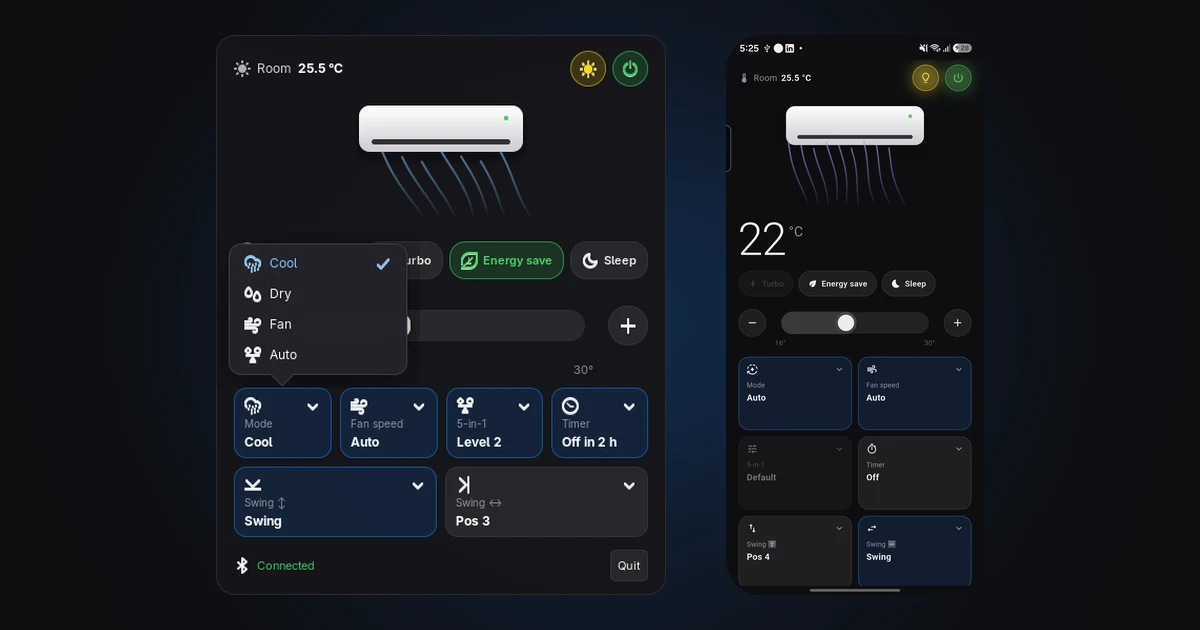
CoolBar is a small app that lives in your menubar and controls a Blue Star air conditioner over Bluetooth. Click the icon, a panel drops down, you change the temperature, and the panel tells you when the AC has actually confirmed it. There is an Android version with the same panel. Nothing talks to a cloud, there is no account to create, and it keeps working when the remote is lost under the sofa.
I did not plan to build it. I saw a post on X by @icanberk where he had made a little status-bar app for his AC so he would stop hunting for the remote, and I thought: my AC was bought last year, surely it has something inside it too. This post is about finding out, because finding out was most of the work.
Is there even a radio in there?
The label on the indoor unit said nothing about Wi-Fi or Bluetooth. The shop listing called it a "Smart AC with Smart App", which could mean anything. So I scanned from my laptop.
Wi-Fi: nothing new. Bluetooth: a device named BLUAC_ followed by a string of hex, advertising away. Its hardware address belonged to Espressif, the company behind the ESP32 chips that hobbyists put in everything. That changed my expectations: an ESP32 means a well-documented toolbox rather than a black box.
Connecting to it and reading its service table confirmed it. The AC speaks BluFi, Espressif's open Bluetooth protocol that normally exists to hand Wi-Fi credentials to a chip. The transport was known before I had sent a byte.
That led to the first real decision. The AC could be put on Wi-Fi and driven through the manufacturer's cloud, or driven locally over Bluetooth. I chose Bluetooth and never regretted it: no onboarding, no router dependency, no account, no servers that might disappear in five years. Just the AC and the laptop, talking directly.
The AC does not answer strangers
I wrote the BluFi framing in Python and asked the AC for its firmware version. It answered. The transport worked on the first try, which is the kind of thing that makes you overconfident.
Everything after that was silence. BluFi has a channel for vendor-specific commands, and whatever I sent down it, the AC said nothing. Not an error. Nothing.
The reason, worked out over an afternoon of comparing what the AC expects with what it was getting, came in layers:
- The AC only listens on that channel after a key exchange, and encrypts everything from then on. Plain text is dropped on the floor.
- Even encrypted, it ignores you until you have paired, and it only accepts pairing while it is in a pairing mode that you enter from the remote: set Cool, 16 degrees, fan Auto, then press one of the special buttons five times within seven seconds until the display blinks. I had to go and do that physically, with the remote I was trying to replace.
- Pairing produces a token that becomes the AC's password. Every later connection starts with a hello that carries it, every command carries it, and the AC encrypts its status reports with a key derived from it.
- Each command must carry a timestamp. Unstamped commands are silently ignored. This one cost me an hour of "but the bytes are right".
Once all of that was in place, I set the temperature from the laptop and watched the number on the indoor unit change. That moment is why people do this.
Trust, but verify, every single control
I did not want an app that sends commands. I wanted one that knows they worked. Fortunately the AC pushes its full state every three seconds once you are paired, so every control got the same treatment: send the change, wait for the AC's own report, check the value came back, then restore the original. A small verification script does this for temperature, mode, fan, power and everything else, and prints pass or fail for each.
That harness caught every surprise:
- Changing the mode as a plain number does nothing. The AC wants the mode bundled with the set-point and fan speed to use in that mode.
- Fan-only mode forces the set-point to 24 degrees by itself, which is how I confirmed which number means "fan".
- Turbo only exists in Cool mode, and turning it on sets the fan to high and the temperature to 16 on its own.
- The "5-in-1 Convertible" button on the remote, which limits the compressor's capacity, is sent as an object with a level, and the AC accepts levels 0, 1, 2, 3, 4 and 6 but refuses 5. I still do not know what the gap means.
- An off-timer of "1" did not switch the AC off within two minutes, so the unit is hours, as the remote shows.
By the end, every button on the physical remote except Clock had a verified equivalent: power, temperature, mode, fan, convertible, turbo, timer, both swing directions, energy save, sleep and the display light.
Designing the panel
The reference I had admired was a dark macOS popover: room temperature and a power button up top, a drawing of the indoor unit with air flowing out of it, a big set-point with a slider, and a row of cards. I wanted the same feel, built from what my remote actually has, and I wanted the airflow to mean something.
So in CoolBar the air streaks only flow while the AC is on. Their speed follows the fan setting, their colour follows the mode (blue for cool, teal for dry, grey for fan, violet for auto), and they sweep or tilt to match the swing settings. The big number counts smoothly to its new value when you drag the slider. Turbo, Energy save and Sleep are chips; Mode, Fan, 5-in-1, Timer and the two swings are tiles that open a picker with every option listed and the current one ticked, because cycling through options with repeated taps turned out to be a great way to set the wrong one. The footer says "Connected", then "Syncing…" while a command is in flight, then "AC confirmed" with what changed. The set-point also sits next to the icon in the top bar.
The Linux app is Python and GTK, registered as a tray icon the way GNOME expects. One detail I liked solving: the ESP32 stops advertising while any device is connected to it, so a crashed client leaves a stale link that blocks everyone. CoolBar now drops leftover links before it scans, and quitting it releases the AC cleanly.
Then a phone, then my brother's Windows laptop
The Android app is Flutter, with the protocol ported line for line and checked against the same test fixtures as the Python version. The Bluetooth plugin I used turned out to have a Linux backend, so I could run the Flutter app on my laptop against the real AC before it ever touched a phone. It paired, decrypted the status, set a temperature and got confirmation on the first run. On the phone it did the same, and the footer read "AC confirmed stemp=22.0" after I tapped the plus and minus buttons.
The AC remembers one pairing token, so pairing a second device fresh would have locked the first one out. The apps let you paste the token from another install instead, and the AC then accepts whichever of them is connected. Anyone within Bluetooth range who has the token can control the AC, so it is treated like a Wi-Fi password.
Windows came from the same Flutter code with a tray mode added: a tray icon by the clock, a frameless panel that pops up above the taskbar, and hides when you click anywhere else. I do not own a Windows machine, so that build is the one part verified only by compiling; my brother gets to test it.
Shipping it
Releasing is one command: push a tag, and GitHub Actions builds the Android APK, the Windows zip and the Linux bundle, then attaches them to a release. Every push runs lint and the protocol tests for both implementations.
Installing on Linux is one line, which I cared about because the whole point was to stop running commands:
curl -fsSL https://github.com/Saffron-codes/coolbar/releases/latest/download/install.sh | bash
That downloads a self-contained bundle (no Python needed), adds CoolBar to the app launcher, starts it at login, and starts it right away. I tested it from the published release on my own machine before writing this sentence.
A note on the name, and on doing this responsibly
It was going to be called Blue Star AC, and then I made the repository public and thought about it. "Blue Star" is someone else's trademark, so the project became CoolBar, with a clear note that it is unofficial and unaffiliated. The protocol work was done to make my own hardware interoperate with software I wrote, nothing from the manufacturer's software is included, and the repository says so. It is MIT licensed.
Most of this was built in a day, working alongside Claude Code: it did the scanning, the protocol implementation, the verification harness and the pipelines while I supplied the remote, the AC and the decisions. The parts that needed a human in the room, pressing a button five times within seven seconds, were still mine.
Get it
The code, the protocol notes and the releases are at github.com/Saffron-codes/coolbar. If you own a Blue Star AC from the same family and try it, I would like to hear whether the pairing dance works on yours.